
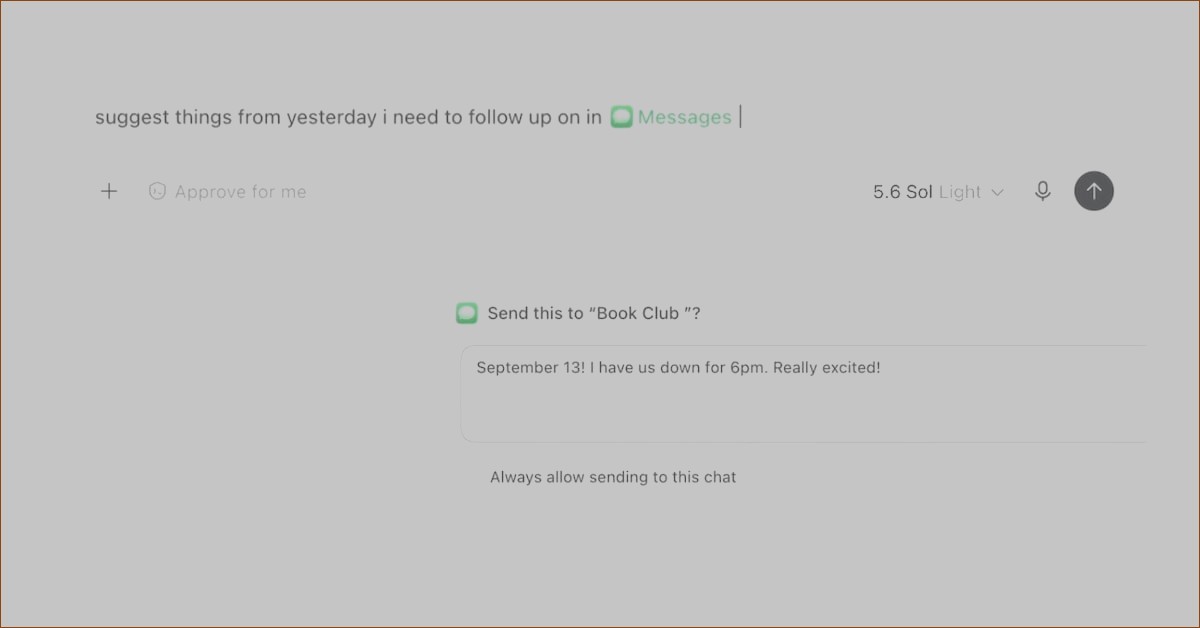
OpenAI has introduced a new Apple Messages plugin for the ChatGPT desktop app designed for macOS. This exciting feature allows users to read and search through iMessage, SMS, and RCS conversations stored on their Macs and also enables them to prepare and send messages directly through the Apple Messages app.
The announcement was made by OpenAI on X and is part of the updates rolled out on August 20. Ari Weinstein, a member of the OpenAI product team, explained that this integration allows ChatGPT to both read and send messages. Additionally, users can edit their messages before they hit send.
The Apple Messages plugin is accessible to all subscription plans of the ChatGPT desktop app, but it is important to note that it only functions on Macs powered by Apple Silicon.
### What You Can Do with the Apple Messages Plugin
With this new plugin, users can ask ChatGPT to locate specific conversations, search through their messages, and even summarize chats. The tool can draft replies based on the conversation’s context and send messages within the Messages app.
OpenAI clarified that the plugin supports iMessage, SMS, and RCS conversations using Apple’s Messages app, but it does not allow interaction with ChatGPT through regular text messages outside of this integration.
To use the plugin effectively, users need to grant specific permissions on macOS. This includes permissions for automation, access to contacts, and full disk access, enabling ChatGPT to send messages, locate contacts, and perform searches for messages upon request.
### Message Approval Before Sending
A safety feature built into this plugin is the requirement for user approval before sending any messages. By default, ChatGPT will ask the user to confirm both the message content and the intended recipients before sending.
While users can choose to enable automatic sending for certain conversations in the future, OpenAI advises caution. Setting up automatic approvals may prevent users from reviewing messages before they are sent, especially in cases where conversations could involve misleading or unverified instructions. Therefore, it’s recommended to maintain the approval step for these high-stakes discussions.
